
Plans and billing
Jobrov's plans and prices in AED, extra credits, what you used this month, and how to pay, see invoices or cancel.
In the Jobrov app, Plan and usage shows your plan and what you used this month. Plans, credits and invoices can't be changed in the app.
Jobrov is free for job seekers. Companies start with a 30-day free trial with no card, then choose a monthly plan. Open Billing to see your plan, buy extra credits and see what you used this month.
Plans
All prices are per month, in AED, and exclude VAT. VAT follows your company's country in Settings: a company in the UAE pays 5% VAT, shown as its own line at checkout and on the receipt. A company outside the UAE pays no UAE VAT (an export of services) and may need to account for VAT or GST in its own country.
| Plan | Price a month | Open jobs at a time | Team members | CV reads a month | Ask questions a month |
|---|---|---|---|---|---|
| Starter | AED 149 | 3 | 2 | 40 | 30 |
| Growth | AED 399 | 10 | 5 | 150 | 120 |
| Scale | AED 749 | 25 | 10 | 500 | 400 |
Until 31 December 2026, type the code ENDOFYEAR2026 in Discount code under a plan before you pay: you pay 25% less for each of your first 12 monthly payments (Starter AED 111.75, Growth AED 299.25, Scale AED 561.75 a month, before VAT). The code is for plans only, not for extra credits.
- Open jobs is how many jobs can be open at the same time. Closed jobs do not count.
- Team members includes pending invitations.
- CV reads is how many CVs that arrive through your job's apply link are read by AI each month. After that, CVs still arrive and get a basic read.
- Ask questions is how many questions you can type in Ask each month.
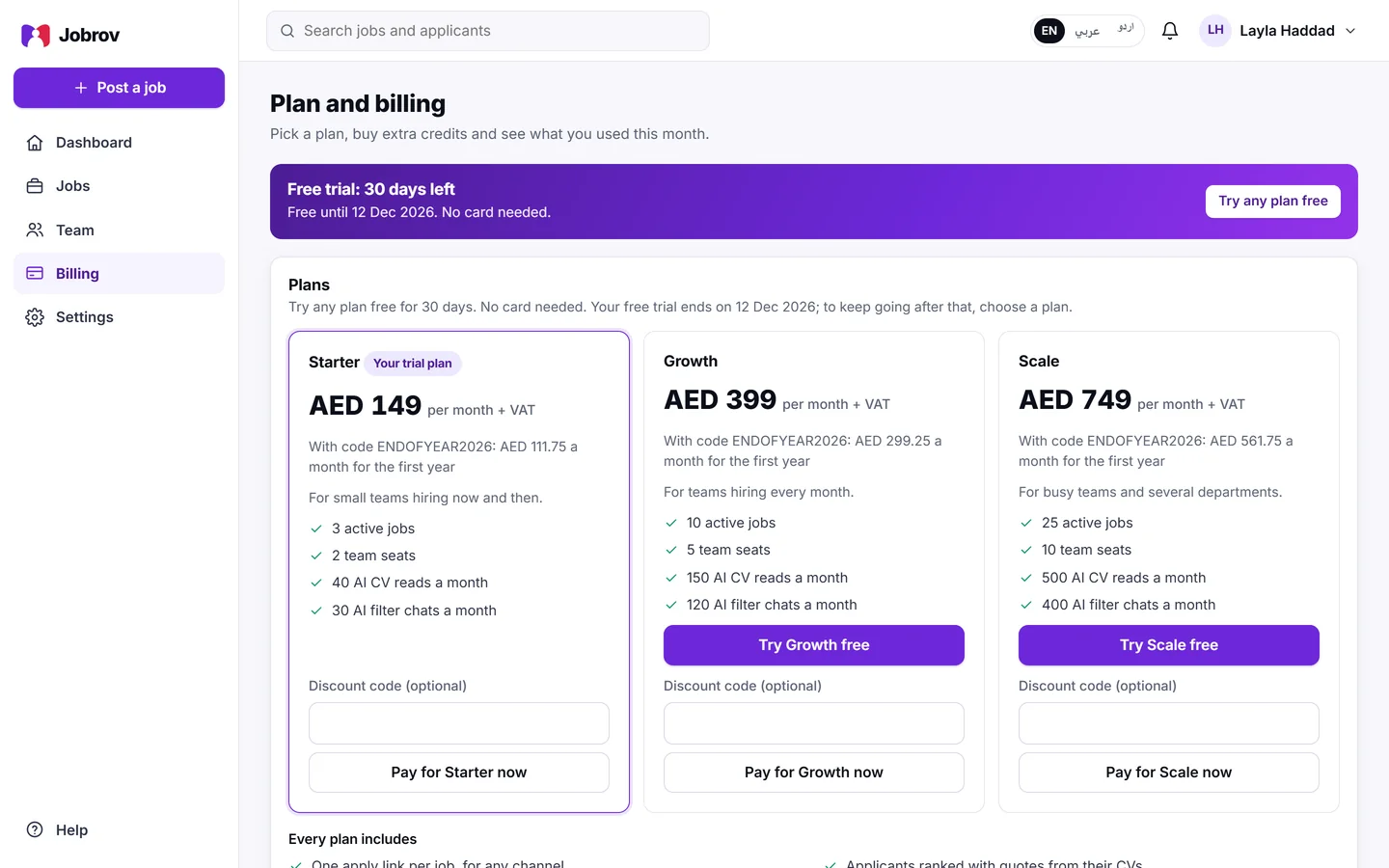
Choose or change a plan
Only the owner or an admin can pay.
- Open Billing.
- Under the plan you want, choose Pay for Starter now, Pay for Growth now or Pay for Scale now during your free trial, or Choose Starter, Choose Growth or Choose Scale after it. During the trial, buttons such as Try Growth free switch your trial to that plan without paying.
- Jobrov opens our payment partner's secure page. Pay by card there.
When the payment goes through you come back to Jobrov and see Payment received. Your plan updates in a moment. Your plan is marked Your plan.
If you see "Online payment is not available right now", contact us to change your plan.
Extra credits
If you use up this month's CV reads or Ask questions, you can buy extra credits. One credit covers one more AI CV read or one more Ask question. Credits are shared by your whole team, carry over to next month and do not expire. A question Jobrov refuses, or a CV the AI could not read, never uses a credit.
Unused packs can be refunded within 14 days: see our refund policy.
| Extra credits | Price |
|---|---|
| 100 | AED 199 |
| 250 | AED 449 |
| 500 | AED 799 |
| 1,000 | AED 1,399 |
Choose Buy under a pack and pay on the same secure page.
This month
The This month card shows how many open jobs, team seats, CV reads and Ask questions you have used, and any extra credits. The monthly counts start again on the 1st of each month. Your dashboard shows the same numbers.
Invoices, card and cancelling
Choose Open invoices to see your invoices, change your card or cancel your plan on our payment partner's secure page. If you have not paid yet, you see You have no invoices yet.
If a payment fails
Jobrov e-mails the account if a payment fails. Update your card from Open invoices. If your plan ends, your account becomes read-only, as after the trial: see Start your free trial.