
Post a job
Paste your job description, check what Jobrov read (title, place, salary and requirements), set must-haves, and publish.
You do not fill in a long form. Paste the job description you already have, in English or Arabic, and Jobrov turns it into a clear job post that you check before it goes live.
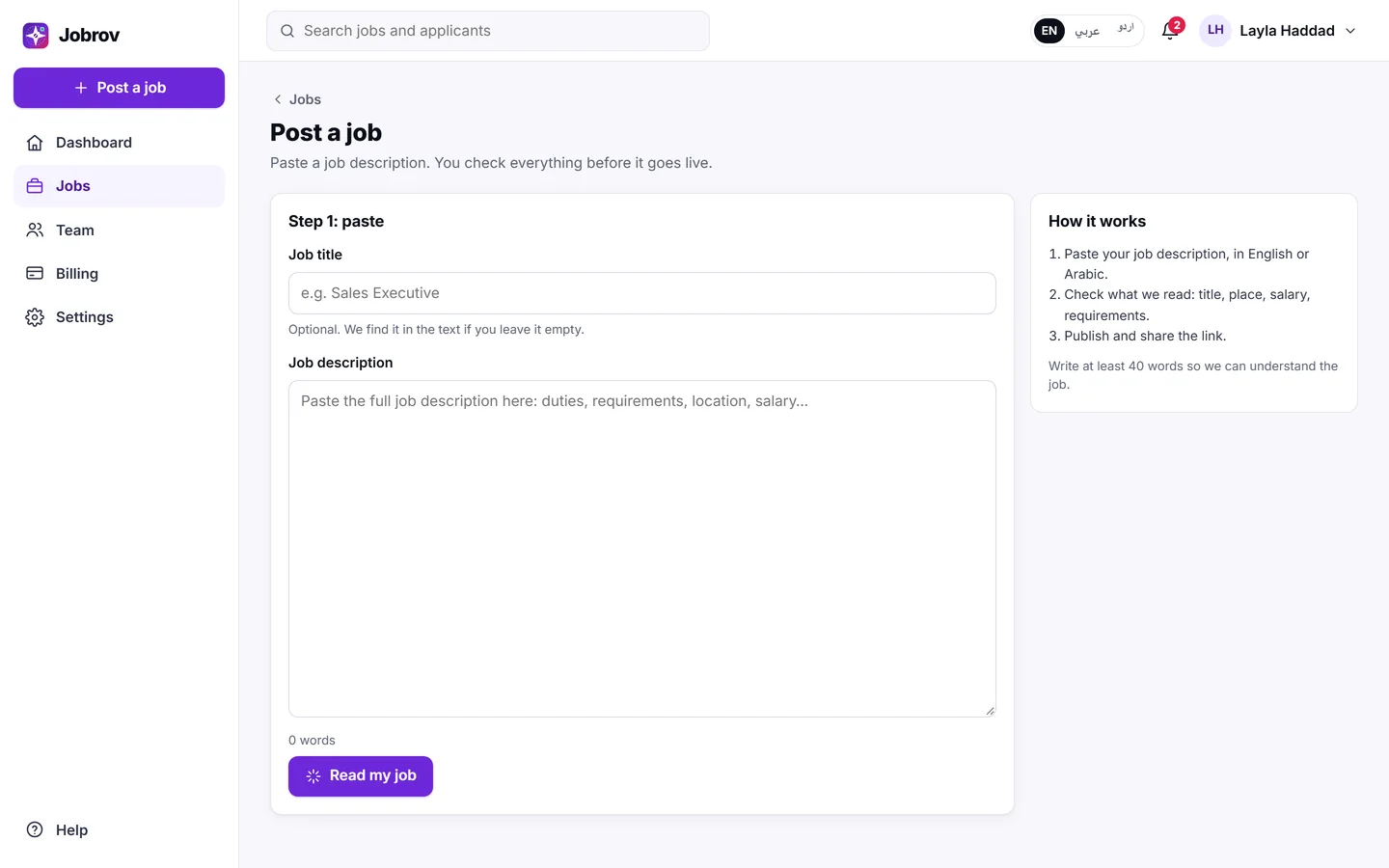
Step 1: paste
- Choose Post a job.
- Paste the full job description in Job description: duties, requirements, location and salary. Write at least 20 words.
- Job title is optional. If you leave it empty, Jobrov finds it in the text.
- Choose Read my job.
Step 2: check and publish
Jobrov shows Check your job with what it read. Check and fix every field:
- Job title, Location and Work type (On site, Hybrid or Remote).
- Years of experience.
- Lowest monthly salary (AED) and Highest monthly salary (AED). Jobs with a salary get more applicants. Leave them empty to hide the salary.
- Job description: the text applicants read.
- Requirements: each one is marked Must have or Nice to have under How important.
If something important is missing, Jobrov tells you at the top, for example "Please check: salary".
Requirements matter most
Jobrov checks every applicant's CV against your Must have requirements and shows you the proof. Nice to have requirements count as a plus.
- Choose Add a requirement to add one that Jobrov missed.
- Remove requirements that do not really matter. Fewer, clearer must-haves give you a fairer and more useful ranking.
Jobrov leaves out requirements about age, gender, religion, nationality, marital status or health, even if they are in the text you paste. See Privacy and fairness.
When everything is right, choose Publish job. You see Your job is live. Share it now. and the share options. See Share your job.
Good to know
- A job you have not published is kept as a draft for 30 days. Choose Start over to paste a different job.
- After you publish, you can still change the job: open it from Jobs and choose Edit. The link and the applicants stay the same.
- To add many jobs at once, choose Upload jobs (CSV) on Jobs. Save a spreadsheet as CSV UTF-8 (in Excel: Save As, then CSV UTF-8 (Comma delimited)); a file that is not UTF-8 is refused, because its Arabic text cannot be read. Nothing is published until you check the file and confirm.
- You can close a job at any time from Jobs or the job page, and reopen it later. People cannot apply to a closed job. To tell the people still waiting, see Let the waiting applicants know.
- The number of open jobs you can have at a time depends on your plan. If you reach it, close a job or change your plan.